
Best PoE switch for small business access points and cameras
By Jordan Ellis Published 11 min read
As an Amazon Associate I earn from qualifying purchases. That costs you nothing and does not decide what gets recommended. We also earn a commission from some links to partner brands (SentryPC, HappyScribe, Sucuri, IceVPN).
On this page (8 sections)
- Key takeaways
- Best PoE switch for small business access points and cameras
- Best for reliability and control: 8-16 port managed PoE switch
- Runner up: 8-port unmanaged PoE switch for simple setups
- Budget option: 5-8 port compact PoE switch for minimal needs
- Upgrade for growth: 16-port managed PoE switch with 240W budget
- How to choose the best PoE switch for your small business
- Questions people still ask
In short: The best PoE switch for a small business powering access points and cameras should have at least 8 ports with a total power budget of 120W to reliably handle typical devices across a single floor office.
Part of the guide: Mesh WiFi sizing for 2500 sq ft two-floor office with 45 devices
Get the right PoE switch that powers your small business devices reliably without overspending or missing features.

8 Port Gigabit PoE Switch with 2 Gigabit Uplink
Supports your small office with 8 PoE+ ports delivering a total of 120 W power for reliable operation of
Check it on Amazon
NETGEAR 8-Port PoE Gigabit Ethernet Unmanaged Network Switch
Delivers 123 W total PoE power across 8 ports, enough to power multiple devices in a small office environment.
See this alternative
Tenveo 8 Port Full Gigabit PoE Switch
Powers 8 high-consumption devices simultaneously with a total PoE budget of 120 W, suitable for small office
See this alternative| Product | total PoE power budget (watts) | Verdict | |
|---|---|---|---|
| 8 Port Gigabit PoE Switch with 2 Gigabit Uplink STEAMEMO | Total PoE budget 120 W meets the 120 W requirement | Meets it | View on Amazon |
| NETGEAR 8-Port PoE Gigabit Ethernet Unmanaged Network Switch (GS108PP) NETGEAR | Total PoE budget 123 W meets the 120 W requirement | Meets it | View on Amazon |
| Tenveo 8 Port Full Gigabit PoE Switch Tenveo | Total PoE budget 120 W meets the 120 W requirement | Meets it | View on Amazon |
| STEAMEMO PoE+ Switch, 8 Port Managed PoE Ethernet Switch(8 POE Ports STEAMEMO | Total PoE budget 120 W meets the 120 W requirement | Meets it | View on Amazon |
| Goalake 8 Ports Gigabit PoE Switch with 2 Gigabit Uplinks Goalake | Total PoE budget 120 W meets the 120 W requirement | Meets it | View on Amazon |
| Typical ports | 8-16 PoE ports |
|---|---|
| Power budget | 120-240 watts |
| Max device power | 30 watts per port |
| Common ports type | Gigabit Ethernet |
| Managed options | Yes/No |
Key takeaways
- Choose a PoE switch with enough ports for all devices plus future growth.
- Total power budget in watts must meet or exceed the combined draw of your devices.
- Managed switches offer better traffic control but cost more and add complexity.
- Unmanaged switches suit simple networks but lack VLAN and QoS features.
- Check wattage per port to ensure high-power devices like cameras are supported.
Best PoE switch for small business access points and cameras
To power access points and cameras reliably in a small business, you need a PoE switch with at least 8 ports and a total power budget of around 120 watts. This ensures each device can draw enough power without overloading the switch.
Most access points and IP cameras consume between 12 and 15 watts at peak. If you have 8 devices, multiply 15 W by 8 to get 120 W to cover all devices with some margin.
Gigabit Ethernet ports are necessary for decent network speed, avoiding bottlenecks in data flow for video streams and wireless connections. Managed switches add traffic control features such as VLAN and QoS, beneficial for busy offices.
Power over Ethernet (PoE) switches come in different power standards: IEEE 802.3af (PoE) delivers up to 15.4 W per port, while IEEE 802.3at (PoE+) provides up to 30 W. For access points and cameras requiring more power, a switch supporting PoE+ is essential to ensure stable operation without undervoltage issues. The other half of this decision is small business wifi router options.
The total power budget of the switch should always exceed the sum of maximum wattage for all connected devices to avoid power allocation conflicts. For instance, if you have 6 cameras at 15 W each and 2 access points at 18 W each, the total is 6×15 + 2×18 = 138 W, so a 150 W or higher budget switch is advisable. Overloading a switch leads to devices shutting down or network instability, which can manifest as intermittent connection drops or failure to power on.
Check the switch’s power distribution policy, as some models allocate power on a per-port basis and may limit simultaneous full-power use. A smart switch will dynamically manage power to prevent overload, but unmanaged models might simply cut power to some ports when the budget is exceeded. Confirming the switch’s power management features helps avoid unexpected device outages.
Best for reliability and control: 8-16 port managed PoE switch
Managed PoE switches with 8 to 16 ports and a power budget of at least 120 watts are ideal for small businesses that need stable, prioritized network traffic alongside reliable power. We go through best business vpn step by step elsewhere on the site.
They support VLANs to segment traffic, QoS to prioritize real-time services like VoIP or security cameras, and remote monitoring. This reduces network downtime and troubleshooting time.
A drawback is complexity and slightly higher cost compared to unmanaged switches. If you don’t have dedicated IT support, expect a learning curve.
Managed switches often provide web interfaces or command-line tools for configuration, letting administrators set port priorities, limit bandwidth, or isolate traffic to improve security. For example, setting VLANs can separate IP cameras from general office traffic, preventing video stream congestion from affecting employee browsing. People in this spot often ask about mesh wifi for small office as well.
Some managed switches support Link Aggregation Control Protocol (LACP), which allows combining multiple ports for higher bandwidth or redundancy. This can be useful when uplinking to a network core, ensuring continuous connectivity even if one link fails. For instance, bonding two 1 Gbps ports can provide 2 Gbps throughput.
A real-world check for managed switch setup is verifying that all connected devices show as active in the switch’s management dashboard and that power consumption per port matches device specifications. Monitoring tools can alert administrators if a device draws more power than expected, indicating possible faults or cable issues.
- Ports: 8-16 gigabit Ethernet
- Power budget: 120-240 W
- Features: VLAN, QoS, monitoring
- Drawback: higher cost and complexity
8 Port Gigabit PoE Switch with 2 Gigabit Uplink
Supports your small office with 8 PoE+ ports delivering a total of 120 W power for reliable operation of access points and cameras.
- Weight 2.09 lb
- Height 1.7 inches
- Length 7.5 inches
Runner up: 8-port unmanaged PoE switch for simple setups
If your small business has a straightforward network with limited devices, an 8-port unmanaged PoE switch with a 120 W power budget will work well.
Unmanaged switches are plug-and-play, requiring no configuration. They power your devices and provide gigabit connections but lack VLANs and QoS.
This is a better choice for users who want easy installation and minimal ongoing management but understand trade-offs in network flexibility.
Unmanaged PoE switches typically do not allow prioritization, so all traffic is treated equally. In a small office with few devices and low network complexity, this is often sufficient. However, in environments with multiple video streams or VoIP calls, unmanaged switches may cause occasional lag or buffering.
For example, a small retail shop using an 8-port unmanaged switch to power four cameras and two wireless access points can enjoy plug-and-play simplicity without configuration. The switch’s 120 W power budget comfortably supports these devices, providing stable operation with minimal setup.
Be aware that if you later expand your network or require traffic segmentation, unmanaged switches cannot be upgraded with these features. This might necessitate replacing the switch, which can be disruptive and costlier in the long term.
- Ports: 8 gigabit Ethernet
- Power budget: around 120 W
- Features: none (plug and play)
- Drawback: no traffic control
NETGEAR 8-Port PoE Gigabit Ethernet Unmanaged Network Switch (GS108PP)
Delivers 123 W total PoE power across 8 ports, enough to power multiple devices in a small office environment.
- Weight 1.3 Pounds
- Height 9.29 inches
- Length 4.02 inches
Budget option: 5-8 port compact PoE switch for minimal needs
When your device count is very low, or budget is very tight, a compact 5 to 8 port PoE switch with a power budget near 60 watts may suffice.
This will cover a few access points or cameras but leaves little room for future growth or power-hungry devices.
These switches usually come unmanaged and lack advanced features, making them suitable only for very simple setups.
Budget compact PoE switches are often fanless and designed for quiet environments, making them suitable for small offices or retail counters where noise is a concern. However, their limited power budget means they can only power low-consumption devices reliably.
For example, a 5-port switch with a 60 W budget can power four cameras at 12 W each (total 48 W) plus one access point at 10 W, nearing the power limit. Adding any more devices or powering more demanding equipment will overload the switch, causing power shutdowns.
Because these switches lack management features, troubleshooting becomes more difficult if issues arise. There is no interface to monitor power usage or network health, so problems often manifest as device failures or poor connectivity, requiring manual inspection and replacement if necessary.
- Ports: 5-8 gigabit Ethernet
- Power budget: about 60 W
- Features: minimal, usually unmanaged
- Drawback: limited power and ports
Tenveo 8 Port Full Gigabit PoE Switch
Powers 8 high-consumption devices simultaneously with a total PoE budget of 120 W, suitable for small office network needs.
- Weight 1.98 lb
- Width 5.5 inches
- Height 1.77 inches
Upgrade for growth: 16-port managed PoE switch with 240W budget
If your small business is growing or plans to add many cameras and access points, look for a 16-port managed PoE switch with around 240 watts total power budget.
This doubles the device capacity and power available versus smaller models, letting you add devices without replacing hardware.
Managed features keep your network running efficiently despite more traffic and devices, though price and complexity increase.
The 16-port managed switches with higher power budgets are well-suited for growing businesses that might add IP phones, door access controls, or additional security sensors alongside cameras and access points.
For instance, a 16-port switch with a 240 W budget can power fifteen 15 W cameras (225 W total) and still have 15 W left for a wireless access point or VoIP phone. This flexibility avoids needing multiple switches or frequent upgrades.
Check that the physical size and heat dissipation of these switches fit your installation area. Larger models may require rack mounting and active cooling, increasing noise and space needs. Planning for these factors prevents future installation challenges and ensures reliable long-term operation.
- Ports: 16 gigabit Ethernet
- Power budget: 240 W
- Features: full management, VLAN, QoS
- Drawback: higher cost, bigger footprint
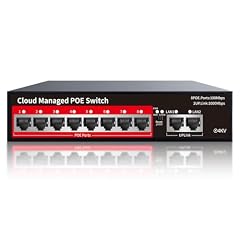
STEAMEMO PoE+ Switch, 8 Port Managed PoE Ethernet Switch(8 POE Ports +2
Delivers 120 W total PoE power across 8 PoE+ ports, suitable for powering multiple access points and cameras in a small office.
- Height 1.7 inches
- Length 7.5 inches
- Width 5.5 inches
How to choose the best PoE switch for your small business
Match the number of PoE ports to your current devices plus 20-30% extra for growth.
Calculate total power budget by summing max wattage of all powered devices; add margin to avoid overloading.
Decide if managed features like VLAN and QoS are needed based on network complexity and critical traffic types.
Consider physical size and noise if installing in a quiet office area.
When calculating your power and port requirements, also consider device startup power, which can be higher than operating wattage. For example, some cameras may briefly draw 20-25 W during boot, so adding a 10-20% margin to the power budget helps accommodate these peaks.
Evaluate your network's critical applications. If you run VoIP phones or video conferencing, prioritize switches with QoS to reduce latency and packet loss. Without QoS, calls may experience jitter or dropouts during busy periods.
Lastly, think about future expansion and potential device upgrades. Buying a switch with a slightly higher port count and power budget than current needs avoids costly replacements. For example, a 12-port switch might cost slightly more than 8-port but saves upgrading hassles if your number of access points or cameras grows.
- Port count: enough for all devices with some spare
- Power budget: sum of max device wattage + margin
- Management: managed if you need traffic control
- Form factor: desktop vs rack-mount and noise
| Option | Best for | Key strength | Main drawback |
|---|---|---|---|
| 8-16 port managed PoE switch | Reliability and control | Full features, good power budget | Cost and complexity |
| 8-port unmanaged PoE switch | Simple networks | Plug and play, decent power | No VLAN or QoS |
| 5-8 port compact PoE switch | Minimal device count | Low cost, small size | Limited power and ports |
| 16-port managed PoE switch | Growing businesses | High capacity and control | Higher cost, larger |
An 8-port managed PoE switch with at least 120W power budget is the best balanced choice for most small businesses.
Questions people still ask
How do I calculate the total PoE power budget I need?
Add the maximum power requirement in watts for each PoE device you plan to connect. Multiply the number of devices by their typical wattage, then add at least 20% extra margin for safety and future growth.
Can I mix PoE and non-PoE devices on the same switch?
Yes, most PoE switches support mixed devices. Non-PoE ports will act as regular Ethernet ports, but only PoE ports provide power to connected devices.
When should I choose a managed PoE switch over unmanaged?
Choose managed switches if you need features like VLAN segmentation, QoS for prioritizing traffic, or remote monitoring. For simple setups with few devices, unmanaged switches are easier.
Is the power budget per port or total on the switch?
The total power budget is the combined wattage the switch can supply across all PoE ports. Each port also has a maximum wattage limit, usually up to 30 W.
Can I use PoE switches with access points from different brands?
Yes, PoE standards like IEEE 802.3af and 802.3at ensure compatibility across devices and brands, as long as devices conform to these standards.