
UniFi Single AP Setup: Can You Skip the Console and Nail it? A Visual Guide
By Jordan Ellis Published 11 min read
As an Amazon Associate I earn from qualifying purchases. That costs you nothing and does not decide what gets recommended. We also earn a commission from some links to partner brands (SentryPC, HappyScribe, Sucuri, IceVPN).
On this page (8 sections)
- The short version
- No, one UniFi AP does not need a console
- PoE options for a single AP: injector versus PoE switch
- Mounting the AP: ceiling or wall, step by step
- Configuring the AP with the app or a browser
- When a console genuinely earns its price
- Troubleshooting a first-time UniFi AP setup
- Questions people still ask
In short: No, a console is not required for a single UniFi AP. Adopt it with the UniFi Network mobile app or its local web page, power it from a PoE injector, and manage it standalone. You only need a console once you run two or more APs or want centralized features.
Part of our guide on powering multiple access points
The box UniFi sells you first is the one a single access point never actually needs.

ThePoEstore Gigabit PoE+ Injector Powerline Network Adapter
Delivers 30 W PoE+ through gigabit passthrough, enough headroom for a U6-series AP running at full 13 W draw
Check it on Amazon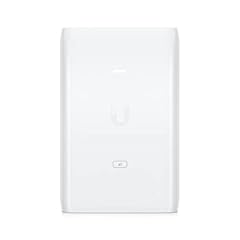
UBIQUITI POE Injector, 802.3AT, 30W of PoE+ Power, Suitable For
Delivers 30 W PoE+ power, explicitly designed for U6-series APs including the U6-LR, U6-Lite, and U6-Pro with
See this alternative
TRENDnet Gigabit Power Over Ethernet Plus Injector,TPE-115GI
Delivers 30 W PoE+ through gigabit passthrough with auto-sensing for optimal power delivery, enough headroom
See this alternative| Product | PoE power delivery (W) | Verdict | |
|---|---|---|---|
| ThePoEstore Gigabit PoE+ Injector Powerline Network Adapter IEEE ThePoEstore | 30 W PoE+ output meets 13 W requirement with 130% margin | Meets it | View on Amazon |
| UBIQUITI POE Injector, 802.3AT, 30W of PoE+ Power, Suitable For U6 AP Ubiquiti Networks | 30 W 802.3at output meets 13 W requirement with 130% margin | Meets it | View on Amazon |
| TRENDnet Gigabit Power Over Ethernet Plus Injector,TPE-115GI TRENDnet | 30 W PoE+ output meets 13 W requirement with 130% margin | Meets it | View on Amazon |
| TP-Link TL-SG1005P, 5 Port Gigabit PoE Switch, 4 PoE+ Ports @65W TP-Link | 30 W per port meets 13 W requirement with 130% margin | Meets it | View on Amazon |
| Console needed for 1 AP | No |
|---|---|
| AP power draw | about 9-13 W |
| PoE injector needed | 802.3af or 802.3at |
| Setup tools | phone app or web browser |
| Cable run limit | 100 m Ethernet |
| Console becomes useful at | 2 or more APs |
The short version
- One AP works standalone: the mobile app or the AP's local web page replaces a console
- PoE is mandatory – a U6-class AP draws roughly 9-13 W, so you need an 802.3af/at injector or PoE switch
- Use Cat5e or better; Cat6 costs little more on short runs
- Standalone mode has no guest portal polish, no roaming history and no unified dashboard
- Add a console or UniFi Cloud Gateway the day you buy a second AP
No, one UniFi AP does not need a console
A console is UniFi's word for a dedicated controller: a Cloud Key, a UniFi Dream Machine, a Cloud Gateway. It hosts the Network application that manages APs, switches and gateways from one dashboard. It is genuinely useful. It is also optional.
UniFi's own setup flow lets you adopt a single access point directly with the UniFi Network mobile app or through the AP's local web interface. The AP stores its own configuration. It keeps running even if the management device goes away, which is the question every sceptical office manager asks first.
What you give up is centralisation. A standalone AP has no unified dashboard, no historical client stats worth reading, and no handoff coordination with other APs. With one AP, there is nothing to hand off to and nobody else needs the dashboard.
Common belief: you must buy a console before any UniFi gear works. What is actually true: a single AP is fully functional standalone, and the console earns its money from the second device onwards. For the detail, see our notes on network access point explained.
- no extra box to buy or power
- nothing else to break or update
- setup finishes in one visit
- no network-wide dashboard
- guest portal features are limited
- reconfiguring means opening the AP directly
PoE options for a single AP: injector versus PoE switch
Every UniFi AP gets both its data and its power down one Ethernet cable. That power is Power over Ethernet (PoE), and without a source the AP stays a white ceiling ornament. Two things can supply it.
A PoE injector is a small brick between your router's switch and the AP: data in one port, mains power in, data plus power out to the AP. It powers exactly one device. Match the standard to the AP's spec sheet – most current U6 and U7 units want 802.3at (30 W class), while older or Lite models accept 802.3af (15.4 W class). A 15.4 W af injector will not reliably run an AP that draws 13 W under full 6 GHz load, so leave headroom.
A PoE switch powers several devices at once and suits an office that already wants Ethernet drops for a printer, a phone or a camera. If the single AP is the only wired device you will ever have, the injector is the cheaper, tidier answer. If that sounds like your situation, read up on step-by-step email account creation next.
Check the AP's listed power draw against the injector's rated output before buying. That one comparison prevents the most common dead-on-the-ceiling outcome.
| Option | Devices powered | Best for | Watch out for |
|---|---|---|---|
| 802.3af injector | 1, up to 15.4 W | Lite and AC-class APs on a single cable run | Too little headroom for U6 Pro or U7 units |
| 802.3at injector | 1, up to 30 W | Any current U6/U7 AP, one cable, done | One mains socket used wherever the injector sits |
| PoE switch | 4-24 ports | Offices adding cameras, phones or a second AP | Costs more; check per-port wattage, not just total |
ThePoEstore Gigabit PoE+ Injector Powerline Network Adapter IEEE 802.3af/at
Delivers 30 W PoE+ through gigabit passthrough, enough headroom for a U6-series AP running at full 13 W draw with auto-sensing to match the device's actual needs.
- Height 2.3 inches
- Length 6.4 inches
- Width 2.2 inches
Mounting the AP: ceiling or wall, step by step
UniFi ceiling APs are disc-shaped on purpose: they broadcast down and outward, so a central ceiling mount beats a shelf in a corner every time. Wall mounting works in narrow offices or corridors, where you aim the disc's face down the length of the room.
Placement beats power. An AP centred over the workspace at 3-4 m height usually covers 100-150 square metres of open plan office; drywall is a mild obstacle, concrete and metal ducting are serious ones. Mount it where the people are, not where the cable happens to arrive.
- Hold the AP roughly where it will live and check signal with a phone app from the farthest desk before drilling. Ten minutes of walking beats a week of complaints.
- Pop the mounting bracket from the AP and mark its screw holes on the ceiling tile or drywall.
- Fix the bracket: two screws into a ceiling tile rail or use the supplied wall anchors on drywall.
- Run the Ethernet cable from your switch or injector location to the bracket. Leave a service loop of about 15 cm above the ceiling.
- Clip the cable into the AP's port, tuck any slack into the ceiling, then twist the AP onto the bracket until it seats.
- Route the other end of the cable to the injector or PoE switch and connect it to your router's LAN. The AP's ring light should start pulsing white.
UBIQUITI POE Injector, 802.3AT, 30W of PoE+ Power, Suitable For U6 AP U6-LR
Delivers 30 W PoE+ power, explicitly designed for U6-series APs including the U6-LR, U6-Lite, and U6-Pro with enough headroom for full 13 W draw.
- Height 3.14 inches
- Length 1.96 inches
- Width 4.72 inches
Configuring the AP with the app or a browser
Two paths, same destination. The mobile app is fastest if your phone and the AP share the network. The web interface works from any laptop and gives you the fuller settings list. Neither requires a console, an account tether or a subscription.
- Install the UniFi Network app and sign in with a Ubiquiti account, or skip the account later via the local path.
- Power the AP and wait about two minutes for it to boot and pull an IP address from your router.
- In the app, tap the adoption prompt for the detected AP, or browse to the AP's IP and accept its self-signed certificate warning.
- Set a device name, an admin password, and – the part that matters – your Wi-Fi name (SSID) and password. Use WPA2/WPA3 for staff, a separate SSID for guests.
- Fix the AP's IP as a DHCP reservation in your router, so you can always find its management page again.
- Update the AP's firmware when prompted, then let it reboot. The ring light goes solid white or blue when it is serving clients.
TRENDnet Gigabit Power Over Ethernet Plus Injector,TPE-115GI
Delivers 30 W PoE+ through gigabit passthrough with auto-sensing for optimal power delivery, enough headroom for a U6-series AP running at full 13 W draw.
- Is adult product False
- Weight 5.7 oz
- Height 1.3 inches
When a console genuinely earns its price
Standalone mode is not a downgrade you must escape. It is a ceiling you will eventually hit, and knowing where it sits stops you over-buying today.
Buy a console or a UniFi Cloud Gateway when you add a second AP, because that is when roaming between them, shared SSID settings and one dashboard start mattering. Buy one when you want a proper guest portal with vouchers or a branded splash page. Buy one when you want client history beyond the last session, or automated firmware windows that do not interrupt the working day.
A Cloud Gateway class device also replaces your existing router, which changes the arithmetic: if your office router is due anyway, the gateway becomes the console for free. If your router is new and fine, the injector-and-standalone path costs far less.
Offices between five and fifty people most often end up here: one AP standalone works fine for years in a small suite, while a two-storey building or a warehouse wants two or three APs and a controller from the start.
| Feature | Standalone AP | With console |
|---|---|---|
| Manage one AP | Yes, app or web | Yes |
| Roaming across APs | Not applicable | Coordinated |
| Guest portal with vouchers | Basic only | Full |
| Client and uptime history | Minimal | Full dashboard |
| Extra hardware and power | None | One box |

TP-Link TL-SG1005P, 5 Port Gigabit PoE Switch, 4 PoE+ Ports @65W, Desktop
Provides four PoE+ ports at 30 W each for powering a U6-series AP plus cameras or phones later, with 65 W total budget across all ports.
- Is adult product False
- Weight 1.76 lb
- Height 0.98 inches
Troubleshooting a first-time UniFi AP setup
Almost every failed first setup is power, adoption or cabling, in that order. Work down the list and you will find the fault without replacing anything.
- Light dead: check the injector is plugged into mains and the AP's port, and that the AP's spec calls for the PoE class the injector provides
- Light pulsing but not found: the AP may be on a different subnet or VLAN; connect your laptop to the same switch as the AP
- Adoption loop: factory-reset the AP by holding the reset pinhole for about 10 seconds while powered, then adopt again
- No internet through the AP: confirm the injector's data-in port goes to the router's LAN, not WAN, and that DHCP is on
- Slow speeds: check the link negotiates at 1 Gbps; a damaged or very old Cat5 cable will silently drop to 100 Mbps

10Gsupxsel Cat 6 Ethernet Cable 3FT 10Pack
Cat6 cable supports PoE and PoE+ power delivery over 3 ft runs, connecting your injector or switch to the AP with 10 Gbps capability.
Skip the console for one AP: mount it, power it with the right PoE injector, adopt it with the app, and save the controller money for the day you add hardware.
Questions people still ask
Can I add a second AP later without a console?
Yes, two APs can each be adopted standalone with the app. You lose coordinated roaming and shared settings, so at two APs most offices buy a console or gateway anyway. It is a convenience cliff, not a hard limit.
Does the AP stop working if I never create a Ubiquiti account?
No. The account is only for app sign-in and cloud features. Adopt through the AP's local web page with a laptop and no account is needed at any point.
Can I power the AP from a normal switch without PoE?
Not directly. You would need the PoE injector placed at the switch end, injecting power into the same cable. Data-only switches do not power the AP.
What happens to my standalone AP if Ubiquiti drops the app?
The AP runs its configuration locally and keeps serving Wi-Fi regardless. Management tooling can change, but the network itself does not depend on a live cloud service.
Is the mobile app enough to manage the AP permanently?
Yes, for day-to-day changes like SSIDs and passwords. For deeper settings – VLANs, radio channels in detail, firmware scheduling – the local web interface gives more control, so keep a laptop handy.