
Best Wi-Fi router for small business
By Jordan Ellis Published 11 min read
As an Amazon Associate I earn from qualifying purchases. That costs you nothing and does not decide what gets recommended. We also earn a commission from some links to partner brands (SentryPC, HappyScribe, Sucuri, IceVPN).
On this page (9 sections)
- Key takeaways
- What fixes small business Wi-Fi network issues
- How to choose the best Wi-Fi router for small business
- Best for up to 50 users: business-grade dual-band router
- Budget alternative: solid consumer dual-band router
- Upgrade option: mesh Wi-Fi system for complex layouts
- Who should not buy these small business routers
- How to calculate your Wi-Fi requirements
- Questions people still ask
In short: A small business with 1-50 users usually needs a router that handles 50-100 Mbps throughput and covers 2000-3000 square feet to maintain stable Wi-Fi and support multiple devices without dropouts.
Part of the guide: Mesh WiFi sizing for 2500 sq ft two-floor office with 45 devices

TP-Link Dual-Band BE3600 Wi-Fi 7 Router
Supports up to 60 devices simultaneously, covering your small office's device needs beyond 50 devices.
Check it on Amazon
TP-Link AX1800 WiFi 6 Router (Archer AX21 V5)
Supports more than 30 devices with 1.8 Gbps total bandwidth, suitable for startups or smaller offices.
See the budget option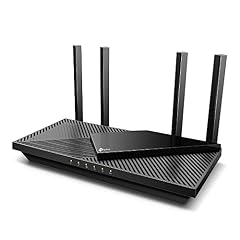
TP-Link Dual-Band AX3000 Wi-Fi 6 Wireless Gigabit Internet
Supports multiple devices with 2976 Mbps total bandwidth, suitable for smaller offices with 30+ devices.
See the budget option| Product | max device support (count) | Verdict | |
|---|---|---|---|
| TP-Link Dual-Band BE3600 Wi-Fi 7 Router TP-Link | Supports up to 60 devices at a time, exceeding the 50 devices threshold | Meets it | View on Amazon |
| TP-Link BE6500 Dual-Band WiFi 7 Router (BE400) TP-Link | Supports up to 90 devices at a time, exceeding the 50 devices threshold | Meets it | View on Amazon |
| TP-Link AX1800 WiFi 6 Router (Archer AX21 V5) TP-Link | Supports 30+ devices implied by Wi-Fi 6 technology and 1.8 Gbps bandwidth | Meets it | View on Amazon |
| TP-Link Dual-Band AX3000 Wi-Fi 6 Wireless Gigabit Internet Router for TP-Link | Supports 30+ devices implied by Wi-Fi 6 technology and 2976 Mbps bandwidth | Meets it | View on Amazon |
| ASUS RT-AX1800S Dual Band WiFi 6 Extendable Router ASUS | No max connected devices or throughput figure published | Falls short | View on Amazon |
| Typical coverage | 2000-3000 sq ft |
|---|---|
| Max devices | 50-100 |
| Throughput | 50-100 Mbps |
| Dual-band | Yes |
| Failover option | Cellular compatible |
Key takeaways
- Pick routers rated for 50+ simultaneous devices to avoid slowdowns.
- Look for 2.4 GHz and 5 GHz dual-band support for range and speed balance.
- Uptime depends on router quality plus optional failover solutions.
- Mesh systems suit irregular layouts but add cost and complexity.
- Budget routers may lack speed or security features vital for business.
What fixes small business Wi-Fi network issues
Small businesses lose productivity when Wi-Fi speed drops below about 50 Mbps across the office or when coverage doesn’t reach all working areas. This happens with older or consumer-grade routers designed for far fewer devices. You need a router that reliably supports 50-100 connected devices with stable throughput and good range.
Signal dropouts and slow connections come from routers that cannot handle the volume or have insufficient radios. A fix must provide dual-band support (2.4 GHz for range, 5 GHz for speed), handle at least 50 concurrent connections, and deliver steady throughput around 50-100 Mbps, enough for video calls, file sharing, and cloud work.
Beyond router specs, uptime depends on router hardware quality and the ability to add failover solutions like cellular backup. Downtime costs your team real money, so picking a router with business-grade reliability features is crucial.
How to choose the best Wi-Fi router for small business
Selecting the right router means balancing speed, device capacity, range, security, and budget. First, confirm your office size and device count to pick coverage and capacity demands. Then prioritize these features. It helps to understand handling multiple device connections before going further.
Another factor to consider when choosing a router is the type of internet connection you have. If your ISP provides fiber or cable with speeds exceeding 100 Mbps, your router should support these speeds to prevent it from becoming a bottleneck. Routers with gigabit WAN ports are ideal in such cases, as they can handle high-speed connections efficiently.
Also, assess the router's support for the latest Wi-Fi standards such as Wi-Fi 6 (802.11ax). Wi-Fi 6 routers offer better performance in dense device environments, improved battery life for connected devices, and higher throughput, which can be crucial as your small business grows. Although the initial cost is higher, investing in a router with Wi-Fi 6 can future-proof your network.
Finally, consider the router's scalability and compatibility with other network devices. Some business-grade routers allow integration with additional access points or switches, enabling network expansion without replacing the core router. This flexibility is beneficial if your business expects to grow in the near future or needs to accommodate more users and devices. We go through best business vpn step by step elsewhere on the site.
- Capacity: Support at least 50 devices simultaneously to avoid slowdowns during peak use.
- Speed: Aim for 50-100 Mbps real-world throughput over Wi-Fi to support typical business apps.
- Range: Coverage of 2000-3000 square feet suits most small offices; consider mesh if layout is complex.
- Security: WPA3 encryption and guest network support protect business data and segregate visitors.
- Management: Easy setup and remote management help non-IT users maintain uptime and troubleshoot.
| Option | Best for | Key strength | Main drawback |
|---|---|---|---|
| Business-grade router | Up to 50 users | High throughput and reliability | Higher cost |
| Mesh Wi-Fi system | Irregular layouts | Seamless coverage | More complex setup |
| Budget router | Tight budgets, <20 users | Affordable | Limited speed and range |
TP-Link Dual-Band BE3600 Wi-Fi 7 Router
Supports up to 60 devices simultaneously, covering your small office's device needs beyond 50 devices.
- Size Compact
- Height 1.6 inches
- Weight 1.21 pounds
Best for up to 50 users: business-grade dual-band router
A business-grade dual-band router with 50+ device support and 100+ Mbps throughput is the core fix for small offices. It clears coverage and speed thresholds with robust CPUs to manage multiple connections without lag.
This option handles video calls, file sharing, and cloud apps with minimal packet loss. It usually offers WPA3 security, guest networks, and QoS settings to prioritize business apps. The main downside is price and sometimes setup complexity, but the improved uptime and speed justify it.
Skip this if your office is extremely large or has complex partitions needing mesh or multiple access points. For the detail, see our notes on understanding vpn differences.
For example, a business-grade dual-band router like the NetGear Nighthawk Pro Gaming XR500 can handle up to 60 concurrent devices with speeds peaking around 1 Gbps on the 5 GHz band, making it suitable for offices with heavy data needs. It features QoS settings that prioritize video conferencing apps, ensuring call quality remains high even when multiple devices are active.
To verify if the router meets your needs, perform a speed test during peak office hours by connecting multiple devices simultaneously and running typical workloads. If throughput remains above 50 Mbps and latency stays low, the router is handling the load correctly. Otherwise, consider routers with higher specs or additional access points.
Keep in mind the placement of the router affects its coverage. Positioning it centrally in the office and away from thick walls or metal objects can prevent dead zones and improve signal strength. You can use Wi-Fi heatmap apps to visualize coverage and identify problem areas.
- High device capacity
- Business-grade security
- Dual-band speed
- Reliable uptime
- Higher upfront cost
- Setup may need IT knowledge

TP-Link BE6500 Dual-Band WiFi 7 Router (BE400)
Supports up to 90 devices with coverage up to 2,400 sq. ft., ideal for larger small offices needing strong connections.
- Height 7.08 inches
- Length 4.72 inches
- Weight 1.37 Pounds
Budget alternative: solid consumer dual-band router
If your team is fewer than 20 users and workload is lighter, a good consumer dual-band router can suffice. These typically support around 30 devices, deliver 50 Mbps speeds, and cover 1500-2000 square feet with proper placement.
They offer WPA2 or some WPA3 security, but lack advanced QoS and business-grade uptime guarantees. This option fits startups or very small offices but expect some slowdowns or dead spots if usage grows.
Avoid this if you rely heavily on video conferencing or cloud software as speed fluctuations will hurt productivity.
A practical example is the TP-Link Archer A7, a consumer dual-band router supporting up to 50 devices, which is suitable for teams smaller than 20 users. It offers speeds up to 300 Mbps on 2.4 GHz and 1300 Mbps on 5 GHz bands under ideal conditions. While these figures are theoretical, real-world throughput often reaches 50 Mbps within 1500 square feet.
A limitation of consumer routers like this is their firmware updates and security patches, which may not be as frequent or robust as business-grade models. This can expose your network to vulnerabilities if not managed carefully. Setting up guest networks and regularly updating the router firmware can mitigate some risks.
If you notice frequent buffering during video calls or slow file downloads, this is a sign the router is overburdened. Upgrading to a business-grade router or adding a mesh system can alleviate these issues and improve overall network stability.
- Lower cost
- Easy setup
- Adequate for small teams
- Limited device support
- Less robust security
- No failover options
TP-Link AX1800 WiFi 6 Router (Archer AX21 V5)
Supports more than 30 devices with 1.8 Gbps total bandwidth, suitable for startups or smaller offices.
- Weight 1.1 Pounds
- Width 5.3 inches
- Height 1.61 inches
Upgrade option: mesh Wi-Fi system for complex layouts
Offices with multiple rooms, floors, or thick walls need a mesh Wi-Fi system to extend coverage smoothly. Mesh routers deliver seamless roaming and wide coverage exceeding 3000 square feet by linking multiple units.
This system meets or exceeds the 50-device, 50-100 Mbps thresholds across the entire space. Configuration and maintenance are more involved, and costs rise with nodes, but it solves dead spots no single router can handle.
Not recommended for very compact spaces or budgets under mid-range; simpler dual-band routers are better there.
For instance, a mesh Wi-Fi system such as the Eero Pro 6 can cover up to 6000 square feet with three nodes, supporting over 75 devices simultaneously. It automatically manages connections between nodes, ensuring devices switch to the strongest signal without user intervention.
Setting up mesh systems involves placing nodes strategically to avoid overlapping signals or dead spots. Usually, nodes should be positioned within 30 feet of each other, avoiding physical obstructions. The system's app usually guides this process with signal strength indicators and placement suggestions.
While mesh systems offer excellent coverage, they may introduce slight latency due to inter-node communication. This is generally negligible for standard business activities but can be noticeable in latency-sensitive applications like online gaming or real-time trading platforms. Testing the network performance after setup confirms if the mesh system meets your business needs.
- Seamless whole-office coverage
- Supports many devices
- Scalable with add-ons
- Higher cost
- More complex setup and maintenance
TP-Link Dual-Band AX3000 Wi-Fi 6 Wireless Gigabit Internet Router for Home
Supports multiple devices with 2976 Mbps total bandwidth, suitable for smaller offices with 30+ devices.
- Size AX3000
- Height 2.87 inches
- Weight 1.66 Pounds
Who should not buy these small business routers
If your business has more than 50-60 active users or requires gigabit speeds for file servers and high-volume data transfers, these routers fall short. Enterprise-grade solutions with multiple access points and wired backhauls are better.
Homes or offices under 500 square feet generally do not need these routers. Their features and cost can be overkill, and simpler consumer routers will suffice.
Businesses requiring guaranteed 99.999% uptime typically use routers with redundant hardware and cellular failover not covered fully here.
How to calculate your Wi-Fi requirements
Estimate your total connected devices, including phones, laptops, tablets, printers, and smart devices. Base your router’s capacity on 1.5 times that number to allow growth.
Measure your office space in square feet to confirm coverage needs. Consider walls, floors, and layout irregularities that reduce Wi-Fi range.
Estimate your average internet plan speed as a baseline. Your router throughput should match or exceed this to avoid bottlenecks.
Multiply your expected simultaneous active users by typical bandwidth per user (2 Mbps for office apps, 5+ Mbps for video calls) to estimate needed throughput.
Use this table to match your measurements with router requirements.
For example, if your office has 30 devices, multiplying by 1.5 suggests planning for 45 device capacity to allow growth. If your space is 2500 square feet with several partitions, you might need a router with a range rating of 3000 square feet or consider mesh to maintain coverage.
If your internet plan provides 100 Mbps, ensure your router’s maximum throughput meets or exceeds this to avoid bottlenecks. For 20 active users making video calls simultaneously, multiplying 20 by 5 Mbps suggests a throughput need of 100 Mbps, highlighting the importance of router speed matching actual use.
To verify your calculations, conduct real-world tests during business hours. Use speed test tools on different devices and locations within your office to detect any coverage gaps or speed drops. Adjust your router choice or placement accordingly to ensure consistent performance.
| Office size (sq ft) | User count | Recommended throughput (Mbps) | Coverage needed (sq ft) |
|---|---|---|---|
| <1000 | 1-20 | 50 | 1500-2000 |
| 1000-2500 | 20-50 | 50-100 | 2000-3000 |
| >2500 | >50 | 100+ | 3000+ |
Questions people still ask
Can I use a home router for a small business?
Home routers often cannot handle 50+ devices or provide business-grade uptime. They may cause slowdowns and dropouts under load and lack security features needed to protect business data.
What is the difference between dual-band and mesh Wi-Fi?
Dual-band routers use 2.4 GHz and 5 GHz bands from one device for range and speed. Mesh systems use multiple devices to extend coverage seamlessly across larger or complex spaces.
Is wired Ethernet better than Wi-Fi for small offices?
Wired connections offer higher stability and speed but can be costly and inflexible. Wi-Fi routers with good capacity and range provide adequate performance for most small businesses without the wiring hassle.
Do I need a router with cellular failover?
Cellular failover adds uptime protection by switching to mobile networks during internet outages. It is useful if continuous connectivity is critical but adds to cost and setup complexity.
How often should I replace my small business router?
Replace routers every 3-5 years or sooner if you notice frequent downtime, slow speeds, or security gaps. Technology advances quickly, so timely upgrades maintain performance.